
Delete a project when you want to permanently remove its help-centre content, screenshots, history, and related stored assets. This is for workspace members managing a specific project.
Step by step
- Open the project, then go to Settings → Danger zone.
- In Delete this project, review the warning: Removes the project and everything generated for it — articles, screenshots, revisions, onboarding history. This cannot be undone.
- Click Delete project.
- In the confirmation dialog, titled Delete followed by your project name and a question mark, read the warning: All of this project's docs, screenshots and history will be permanently deleted. Then type your project name exactly as shown into the text box.
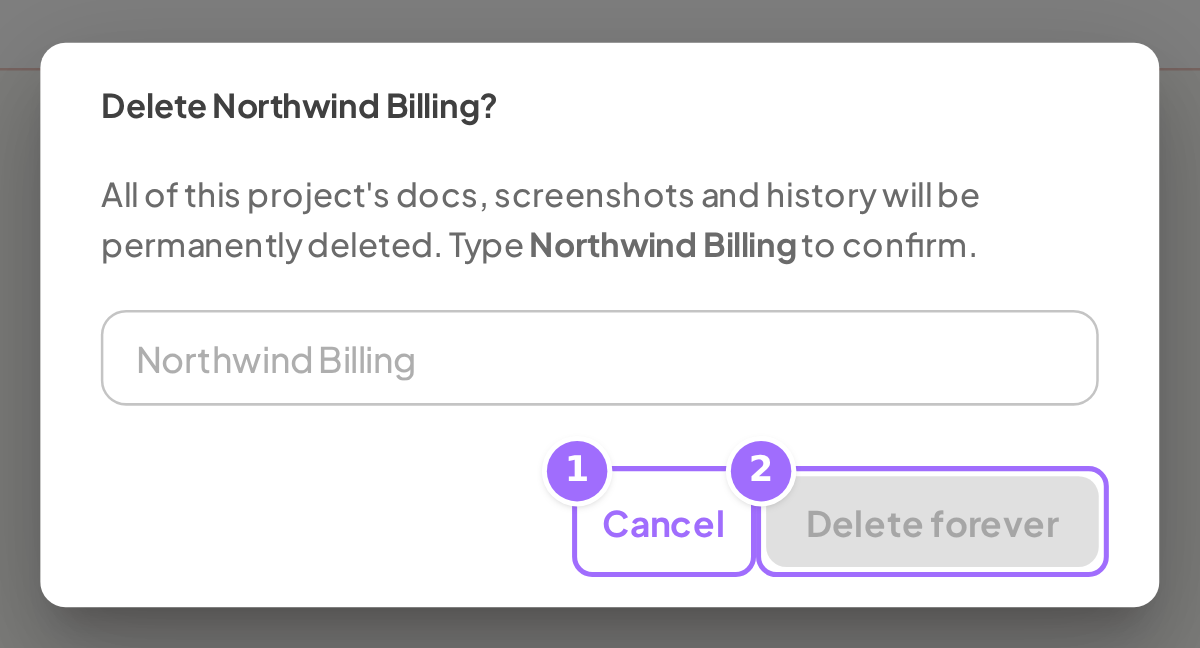
- Click Delete forever.
- To stop, click Cancel.
- After the project is deleted, you are returned to Projects.

Good to know
What is deleted? The project and everything under it are removed, including features, articles and revisions, screenshots, onboarding state, and stored assets such as generated docs and screenshots, crawl captures, repo snapshots, seed and app database dumps, article uploads, and changelog images. A temporary working copy of your code that Ellie keeps on its analysis servers is not removed the moment you delete a project; it is discarded automatically, oldest first, as that size-limited cache fills.
What if file cleanup fails during deletion? Deletion is immediate. File cleanup is best-effort, and a storage cleanup failure does not restore the project. There is no trash or restore.
Does deleting a project free up a project slot? Yes. Deleting a project frees a slot against your plan's project limit: Free 1, Starter 1, Growth 3, Scale 10.
Does deleting a project disconnect GitHub? No. Deleting a project does not remove the GitHub App installation. To stop Ellie reading a repo, revoke the Ellie Docs GitHub App's access on GitHub.
Can I delete my workspace or account from the dashboard? No. There is no delete workspace or delete account control in the dashboard. To remove a workspace or account entirely, use the Contact support entry in the app sidebar to start a conversation with Ellie Docs support; the in-app chat widget will open, falling back to email if the widget is unavailable.